 F1 Strategy Hub
Updates / 4.24.0
Tracks page with race plan and tyre life per track, filters, search (Ctrl+K), latest race and form on Home
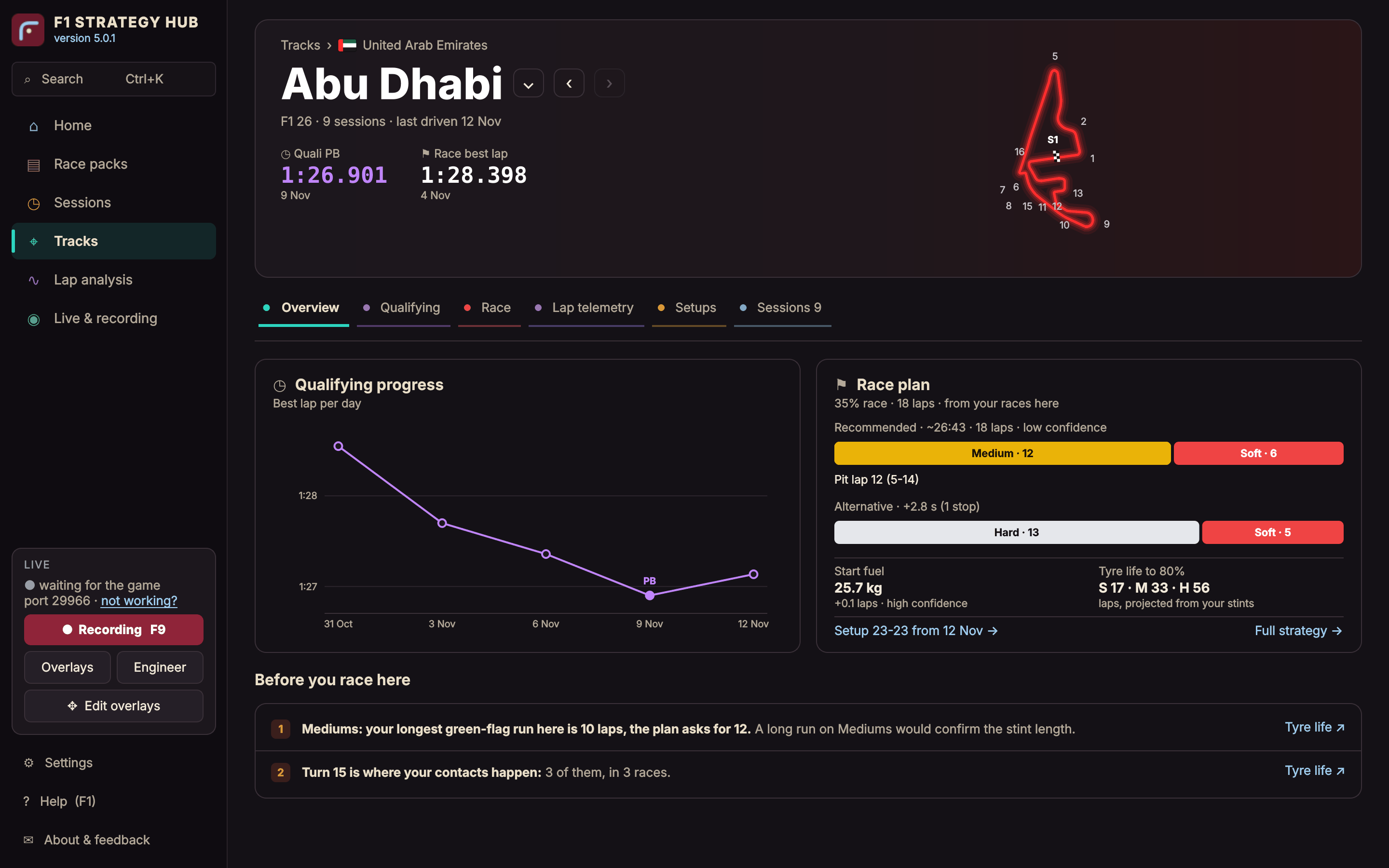
Tracks
- New place on the left: a card for every track you drove, with its outline, quali PB, last race and sessions. Sort by calendar, recent or most driven.
- The page of a track: map with corner numbers and sectors, quali PB and best race lap, and the tabs Overview, Qualifying, Race, Lap telemetry, Setups and Sessions.
- Overview: your quali progress, a race plan for the race length you pick (stints, pit lap window, start fuel, tyre life to 75 % wear, the setup) and what to do before you race there.
- Qualifying: every lap of every quali session, your theoretical best and each sector. Race: tyre life per compound, the strategy with the wear at each stop and your peak pace race by race.
- Setups: your quali and race setup with Copy setup, and every setup you ran there. Sessions: your weekends at the track, one click opens the report.
Filters
- Sessions: All, Races, Long runs, Qualifying, Time trial, Practice; online or offline; the game when you have F1 25 and F1 26 sessions; and a search. The list and the dashboard follow it.
- Lap analysis: session kind, online or offline, valid laps only, tyre compounds, and an AI drivers switch to hide the laps of AI cars.
- Both filters stay when you close the app. Reset shows everything again.
Search and Home
- Ctrl+K (or Search at the top left): tracks, sessions and drivers. Enter opens the track page, the report, or the sessions with that driver.
- Home shows your latest race (finish, grid, the lap you retired on and where you were running, best lap) and your form over the last 5 races, with Full form for every race.
- The navigation item Sessions & tracks is now Sessions; the per track pages are under Tracks.
- Lap analysis: lap A is red, lap B green.
The layout of the Tracks pages follows the F1 Telemetry Viewer by Fabrizio Rinaldi (MIT licence); see About.
The first start after the update reads the session list once again (a few seconds with many sessions).
How to update: the app offers it at startup (Update now). Or download the setup from GitHub and run it; your packs, sessions and settings stay.