 F1 Strategy Hub
Updates / 5.1.1
Smoother live data, reliable team radio, Race mode that follows every race, your own strategies, three race plans and throttle lifts in the lap analysis
This update fixes the pauses in live data and the team radio, and adds two things you asked for: more than one strategy on the Track page, and a closer look at your pedals in the lap analysis.
Live data without pauses
- No more freezes while saving: the app saves your session after every sector and lap. That used to happen on the same thread that receives the game's data, so with a long race (and more so with OneDrive or a virus scanner on the data folder) the HUD, overlays and the engineer window stood still for up to a few seconds. Saving now runs on its own thread; receiving never waits for the disk.
- A short gap keeps the last values: when data stops for a moment, the engineer window keeps showing the last values instead of greying out. After 5 seconds a small "data 6 s old" note appears; only a driver who is really gone (30 s) greys the panels.
- No crash while sharing: fixed a rare crash when a window closed while a session was shared live.
Race mode follows the race, and your own strategies
- The lap always counts up with Lap live from UDP: Race mode used to stand still when the pack's track name differed from the game's (a pack called Belgium or Spa-Francorchamps for the game's Spa), while another tab was open, or when the game's race was longer than the pack. It now matches the track by its other names, keeps following on every tab, and follows the game's lap. Next to the box it says what it does ("following the game: lap 6 of 33") or why it cannot ("the game is in qualifying").
- Custom strategies: pick Custom ... under Starting strategy and enter your own plan, for example S-M-M boxing on laps 12 and 24. The app checks the pit laps and the two compound rule, warns about tyre life, and saves it with the pack. It works like the pack's strategies everywhere: Race mode, the live call, your HUD and your engineer's view.
- Flashbacks and restarts over a pit stop no longer count the stop twice.
- Pick the race length: in a pack's header and in Race mode, choose 25 %, 35 %, 50 % or 100 % of the Grand Prix distance (for example "50 % · 28 laps" at China) or your own lap count. Strategies, pit windows, fuel, Race mode, the HUD and your engineer's plan are worked out for that length; the pack keeps its own data and Reset goes back to it. Following the game, Use the game's length takes the game's lap count in one click.
- The race distance is worked out, not guessed: the header used to say 50 % for any pack. It now shows the real share of the Grand Prix distance and warns when the laps are no game setting. Pasting two Discord track messages at once no longer mixes their laps and pit loss: only the first message is read.
See and remove the sessions a pack uses
The Own data tab of a pack now starts with Sessions used: every recording the pack's numbers come from, with its date, race length, clean laps and what it feeds (tyre wear, pace, pit loss, fuel, quali). Sessions the app looked at but left out are listed with the reason (other race length, too few clean laps, other game). x Remove takes one session out of this pack only: the recording stays, everything is worked out again at once, and the pack's header says what changed ("wear per lap M 2.5 % -> 2.0 %"). Removed sessions can be added back.
Compare against every driver in the lap analysis
- Every lap of every driver: pick one session and A and B list every whole lap of every car recorded with you (up to the 10 fastest per car), not only their fastest lap. AI laps show with AI drivers ticked.
- Your laps are yours: in some sessions your own laps were listed under your name as another driver, and they were the only lap offered. They are now your laps again, also in sessions recorded before this update.
- Race pace only in races: "race pace lap" and "Best race pace" no longer show up in qualifying, practice or time trial.
- A and B are never the same lap: A starts on your lap, B on another driver's fastest lap. When only one lap matches the filter, B stays empty with a note.
- Laps driven again after a flashback replace the undone lap, spectated sessions no longer record car 1 as you, and the playback no longer crashes when a filter leaves no lap.
Team radio that always arrives
- Messages sent close together are no longer dropped: they wait in line and each one gets its turn on the HUD, in order.
- BOX BOX comes first, then lets the other messages through and comes back until you acknowledge it or enter the pit lane.
- Long messages are shown in parts instead of being cut off, and engineer messages are no longer hidden behind race control notes or the Safety Car line.
Three race plans on the Track page
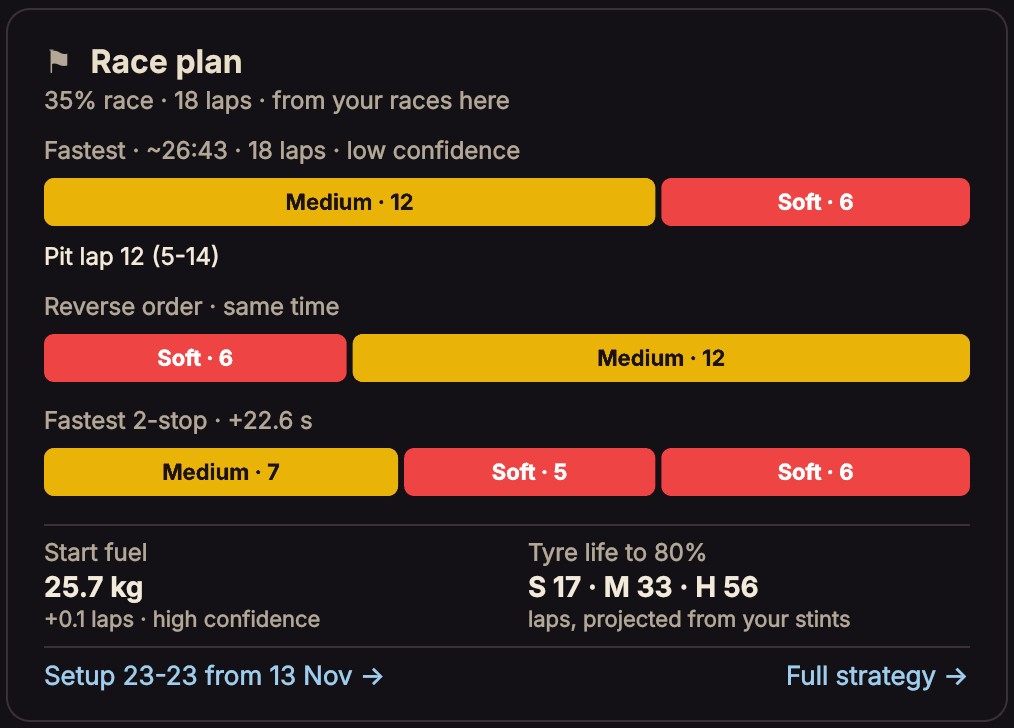
The Race plan card now works out three strategies for the race length you pick, each with its stints and how much slower it is than the fastest:
- Fastest: the quickest plan from your races here (and the race pack), with its pit lap and pit window.
- Reverse order: the same tyres the other way round, for example Hard then Medium instead of Medium then Hard. When the order cannot be turned round (Medium, Hard, Medium), it shows the best plan that starts on another tyre.
- Fastest 2-stop: the best two-stop plan. When the fastest plan already stops twice, this is the fastest one-stop instead (or a three-stop in long races where no one-stop keeps the tyres alive).
A plan that is a little faster but needs an extra stop is marked "not worth the extra stop", so you see why it is not the first choice.
Throttle lifts and a Throttle & Brake chart
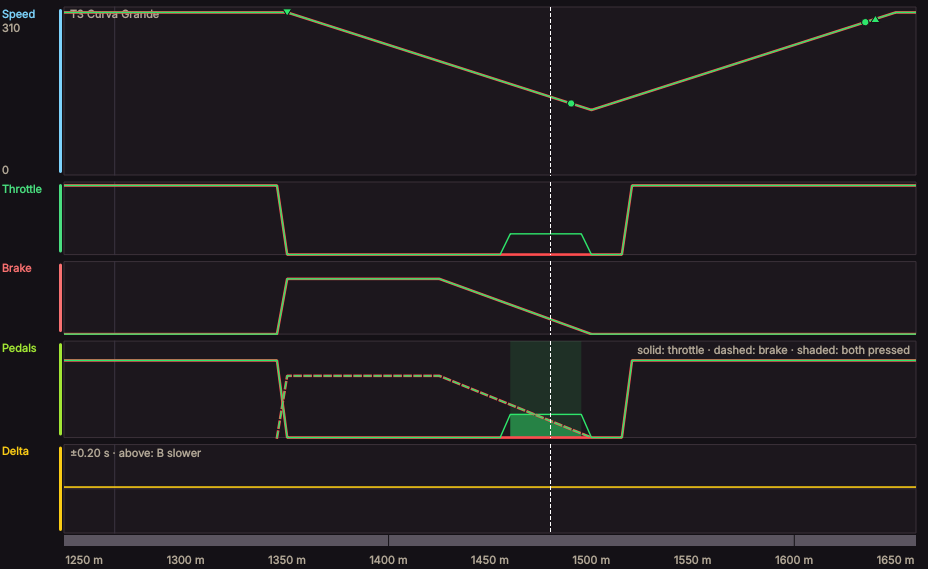
- Partial throttle lifts: the lap analysis now finds where you come off full throttle without braking (for example to 60 % into a fast corner) and back on again. Each lift gets a hollow diamond in the throttle chart; hover it for "Lift to 45 % for 38 m". The corner by corner text tells you where the two laps differ, like "lifts to 60 % for 28 m, A stays flat".
- Throttle & Brake channel: pick it in Channels. Throttle (solid) and brake (dashed) of both laps share one chart, and where you press both pedals at once the chart is shaded, so trail braking and pedal overlap are easy to see.
How to update: the app offers it at startup (Update now). Or download the setup from GitHub and run it; your packs, sessions and settings stay.